
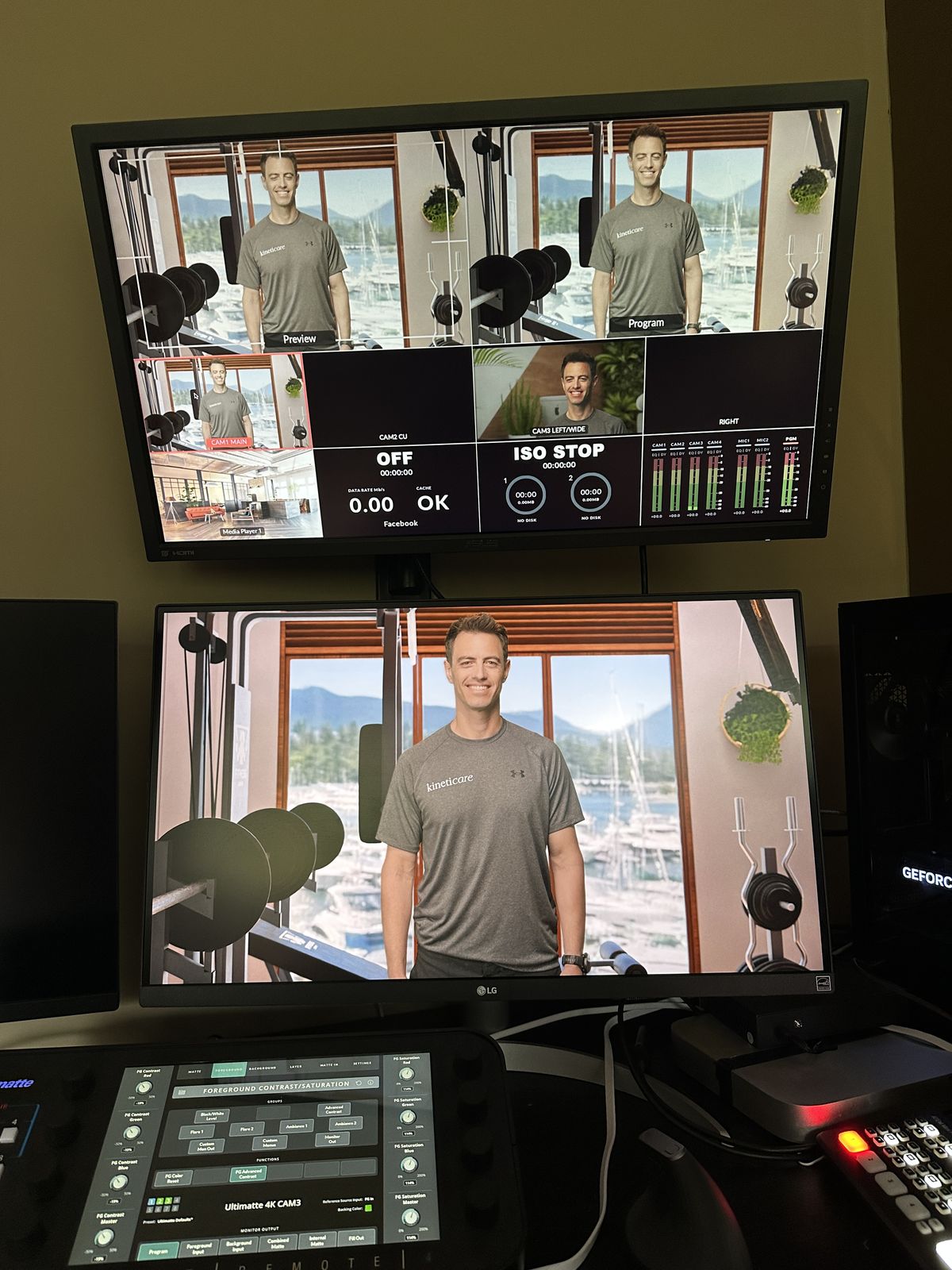
Virtual production is a way of filming real people with a real camera while a digital set is placed behind them as you shoot, so you can see the finished scene on a monitor in the moment. Instead of travelling to an office, a warehouse or a living room, you sit in a studio and the location comes to you.
That’s the short answer. The rest of this guide explains how it works, how it differs from a plain green screen, when it’s the right choice (and when it isn’t), and what affects the cost. If you’d rather see it in person, our virtual production studio on Vancouver Island in South Nanaimo is built around exactly this kind of shoot.
Virtual production in one paragraph
You stand or sit in front of a green screen cyc (a curved green wall and floor with no visible corners). Cameras and lights are set up just as they would be on any professional shoot. Software in the control room removes the green and replaces it with a digital environment, such as a boardroom, a talk-show set, a home office or a high-rise view. Because this happens live, everyone in the room can watch the composited picture on a monitor while you record. What you see is very close to what your audience will see.
How it differs from a regular green screen edit
With a traditional green screen shoot, the background is added later in editing. Nobody on set sees the final picture, so lighting, framing and eye lines are partly guesswork, and problems often show up only in post.
With virtual production, the background is there during the shoot. That changes three things:
- You can fix problems on the spot. If the lighting on your face doesn’t match the set, or your hand disappears into a shadow, it’s visible right away.
- Presenters perform better. It’s easier to look natural when you can see where you “are.”
- Editing is faster. Much of the compositing work is already done when the camera stops.
How a shoot works
Every studio runs things a little differently, but a virtual production day usually follows the same rhythm.
01Plan the message and the set
Before the shoot, you decide what you’re saying and where you want to appear. A CEO update might suit a polished office. A podcast might suit a talk-show set. A course might suit a clean, branded backdrop with room for on-screen graphics. At MediaHive you can choose from several existing sets, or the team can design a custom set for your show.
02Shoot on the cyc
On the day, you come into the studio, get settled in the green room, and step onto the set. The crew handles lighting, cameras and sound. If you’re reading a script, a teleprompter keeps you looking straight into the lens. If you’re nervous, that’s normal, and you can do as many takes as you need.
03Watch it live, review it before you leave
The composited picture plays in the control room as you record. After the shoot, you can review your takes in the control room viewing area, so you leave knowing you have what you need instead of waiting days to find out.
04Edit and deliver
Because the studio records and edits live, MediaHive can deliver content the same day or the next day if you’re posting it yourself. If you’d rather not handle posting, the team can upload your videos for approval and schedule them to your social channels and YouTube.
Want to see what your message would look like on a virtual set? Book a call and we’ll talk through sets, scripts and timing.
When it beats a location shoot
Virtual production isn’t the answer to everything, but it’s the better choice more often than people expect. It tends to win when:
- You need several looks in one session. You can record an executive message in an office, a product demo in a warehouse-style set and a podcast intro on a talk-show set in the same morning, without moving anyone.
- Your real location is hard to film in. Busy offices, noisy shop floors, cramped clinics and spaces with patient or customer privacy issues are all hard to shoot. A studio gives you quiet, controlled light and nobody walking through the back of the frame.
- You don’t want to disrupt your business. Nobody has to clear a boardroom or close a dining room for a day.
- Weather, permits and travel are a risk. On the BC coast, rain and short winter days can push outdoor shoots around. A studio shoot happens on the day you booked it.
- You want a consistent look across a series. Monthly videos, course modules and podcast episodes look like they belong together when they’re shot on the same set with the same lighting.
When a real location is better
Be honest about this before you book. A real location is the better choice when the place itself is the story: a vessel at sea, a production line, a job site or a landscape. Viewers want to see the real thing, and no digital set replaces that. That’s why MediaHive also shoots documentary and on-location work, including drone footage, across Vancouver Island and the Lower Mainland.
Many good projects mix the two: interviews filmed in the studio, cut together with real footage from your site.
What affects the cost
There’s no single price for virtual production, because you’re paying for time and choices rather than a fixed product. These are the things that move the number:
- Studio time. How many hours you need on set, and whether you can batch several videos into one session.
- Package length. Packages run anywhere from one hour to a full day. If you want to film several podcast episodes or a learning series in one day, we reserve the studio for the entire day, so you can take breaks between filming.
- Number of cameras. You can choose anywhere from one to four cameras, and HD or 4K production. Both make a difference to set-up time and post-production time.
- Type of background. A solid-colour virtual wall, or black drapes like a black-box set-up, costs less than full virtual production where every camera has a different virtual background.
- Set choice. Using an existing virtual set is simpler than designing a custom one for your brand or show.
- Physical set. A standard set-up from our studio set library, such as an armchair, a desk or a table, costs less than building custom furniture.
- Preparation. Whether you arrive with a finished script, or want help with strategy, scripting and on-camera coaching.
- Editing and graphics. A single take with a lower-third title is quick. Multi-camera edits, B-roll, captions and motion graphics take longer.
- Deliverables. One long video, or one long video plus a set of vertical clips for Reels, Shorts and LinkedIn.
- Distribution. Whether you take the files and post them yourself, or have the studio publish and schedule them for you.
For typical market ranges for business video in BC, read how much a corporate video costs in BC.
FAQ
01Is virtual production the same as green screen?
Not quite. Both use a green backdrop, but with a plain green screen shoot the background is added later in editing. With virtual production, the digital set is composited live, so you and the crew see the finished scene on a monitor while you record. That makes it easier to get lighting, framing and performance right on the day.
02Do I need to bring anything to a virtual production shoot?
Bring your script or talking points, a couple of outfit options, and anything you want to show on camera, such as a product. Avoid green clothing, because it can disappear into the background. Our guide on what to wear on camera covers colours, patterns and accessories.
03Can I choose the set?
Yes. You can choose from the studio’s existing virtual sets, which include office, home-office, warehouse, high-rise and talk-show looks, or ask about a custom set designed for your brand or show.
04Can I see the result before I leave the studio?
Yes. The composited picture plays live in the control room, and you can review your takes in the viewing area right after the shoot.
05Is virtual production only for big companies?
No. It’s useful for anyone who needs to look professional on camera, including podcasters, coaches, course creators, small businesses, nonprofits and corporate teams. A simple colour background is also available as a budget-friendly option for short direct-to-camera messages.
Ready to try it? Book a call to plan your first virtual production session.